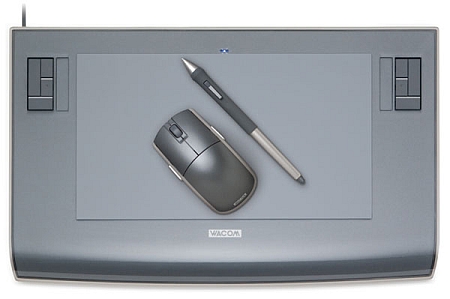
Wacom has just released the 6×11 version of the intous 3. This is mainly for use with wide screen monitors or dual monitors. A Wacom tablet (graphire 3 or intous 3) is great for any photoshop designer or artist.
PRESS RELEASE
New Intuos3 6×11 is Designed for Use with Widescreen Displays and Dual Monitors
Wacom Technology Corporation’s new Intuos3 6×11 pen tablet is specifically designed for photographers, designers and artists who are using multiple monitors or a widescreen display like the 23” Apple Cinema HD display. The Intuos3 6×11 features an active area with an aspect ratio (height-towidth) that is a great match to the screen aspect ratio of either a widescreen display or two standard displays used together. This provides optimal pen control and efficient use of the entire tablet.
“With as much as 50% of the creative community soon using either widescreens or dual monitors, we’re confident that the Intuos3 6×11 is going to be very popular,” said Michael Marcum, Wacom’s Director of Product Management. “The Intuos3 6×11 is really a demonstration of the importance we place on identifying emerging customer needs and providing products in a timely way to meet those needs.”
Creative Controls for the Seriously Creative
The Intuos3 6×11 comes with all the features that have made the Intuos3 line of pen tablets the de facto standard for the serious photographer, designer and artist. Intuos3 turns on the full power of Adobe® Photoshop®, Corel® Painter™ and over 100 other leading software applications with its intuitive controls. Programmable ExpressKeys™ and Touch Strips are within easy reach for modifier keys, keyboard shortcuts, scrolling, zooming, controlling brush size and more. The comfortable cordless, battery-free Grip Pen offers 1,024 levels of pressure sensitivity for superior creative input and, when used alternately with the ergonomic five-button Intuos3 mouse, reduces repetitive motion. The Intuos3 6×11 has a suggested retail price of $389.95.
Perfect Companion for the Wacom Cintiq 21UX
The Cintiq 21UX interactive pen display (priced at $2499) combines the advantages of an LCD monitor with the control, comfort, and productivity of Wacom’s most sophisticated patented cordless, battery-free tablet technology. Users report that working with the pen directly on the screen yields significant productivity gains. Using the new Intuos3 6×11 with the Cintiq 21UX lets users navigate seamlessly across multiple monitors (including the Cintiq) with a single pen.
Valuable Software Included
All Intuos3 pen tablets include Adobe Photoshop Elements 3 for digital photo editing, Corel Painter Essentials 2 for creating natural media art, nik Color Efex Pro™ 2 IE for selectively applying photographic enhancements, and Wacom Brushes 2 for even more brush choices in recent versions of Photoshop and Photoshop Elements.



 CreativePro.com has a free sample chapter from theGraphic Design Portfolio-Builder: Adobe Photoshop and Adobe Illustrator Projects book.