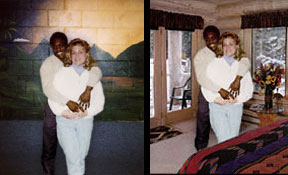
 A company called Friends Beyond the Wall provides a service for prisoners and their families by pasting them in front of exotic vacation backgrounds.
It only costs $10 and you and your jailbird spouse can go on exotic vacations with out even leaving the jail cell.
The testimonials are very positive and it is a good way of using Photoshop in a positive way by helping people patiently waiting for their friends.
 Photoshop
  Graphics.com has just posted a small but helpful collection of tips that would help when making composites. The link to the tutorial is:
 When I first started with photoshop I really did not ever find the need to use selection masks. Now I feel that they save a lot of time and are very useful.